[SECCOMP] SECCOMP using prctl function
Table of Contents
0x00. Introduction
The SECCOMP (SECure COMPuting mode) is a feature of Linux kernel that provides sandboxing of process. In detail, it restricts the syscalls that are executed in the process, and terminates the process (SIGKILL) if a syscall is not allowed one. Unlike other mitigations, it is not applied at compile time, but rather at run time.
It seems that it was activated through the value of the /proc/<pid>/seccomp in the past, but it had been changed to be set through prctl or sys_seccomp.(I don’t know since when…)
In this post, I will describe the SECCOMP using the prctl function.
0x01. prctl function
int ;
The prctl function is a function for managing the properties of processes or threads (PRocess ConTroL). In addition to applying SECCOMP, which will be explained in detail, it can be used to obtain the process name or the endian information. Basically it receives a variable number of arguments and operates according to the desired action.
/* Values to pass as first argument to prctl() */
/* Get/set current->mm->dumpable */
/* Get/set unaligned access control bits (if meaningful) */
/* Set/Get process name */
/* Get/set process endian */
/* Get/set process seccomp mode */
// -----------------------------------------
// -----------------------------------------
In the prctl.h, you can check the values of the macros that go into the first argument, option. Among them, let’s take a closer look at PR_SET_NO_NEW_PRIVS and PR_SET_SECCOMP, which are related to the SECCOMP.
PR_SET_NO_NEW_PRIVS
int ;
The example above sets the no_new_privs property of the current process as value.
This property can be checked in the NoNewPrivs field of /proc/<pid>/status since the Linux kernel 4.10. If the value of this property is set to 1, the current process and it’s child processes cannot execute codes that grant new privileges. However, they can still execute codes that revoke privileges.
The importance of this property will be described in the SECCOMP_MODE_FILTER part.
PR_SET_SECCOMP
int ;
Now, we come to the actual control of SECCOMP, which has two modes.
/* Valid values for seccomp.mode and prctl(PR_SET_SECCOMP, <mode>) */
In the seccomp.h, each mode is defined as a macro.
SECCOMP_MODE_STRICT
In this mode, only four syscalls are allowed: read, write, exit, and sigreturn. The third argument is not necessary because the available syscalls are already defined.
int
As a result of compiling and executing the code above, SIGKILL occurred in open like the following.
SECCOMP_MODE_FILTER
This is a mode that the user builds a rule set to block certain syscalls. The filter mode can be executed only when no_new_privs property is set via the PR_SET_NO_NEW_PRIVS.
The rule set is an assembly-like syntax called Berkeley Packet Filter (BPF), which will be covered in detail in the seccomp-tools section. The following is an example code of filtering out write syscalls.
static unsigned char filter =
;
int
As a result of compiling and executing the code above, SIGSYS occurred in open like the following.
)
I tried to debug the process because it printed a different message from the SIGKILL message of the strict mode, and I found that the process was terminated by SIGSYS in filter mode.
0x02. seccomp-tools
Looking at the example code of SECCOMP_MODE_FILTER, you need to change the filtering rule into bytecodes and put them in the filter array. However, even if you are an expert, it is difficult to freely convert the desired BPF rule into bytecodes. In this case, seccomp-tools is a good tool to use.
You can install seccomp-tools like the above.
)
As you can see in the usage, there are commands like asm, disasm, dump, and emu.
asm
This command converts BPF rules written like the following to bytecodes.
A = arch
if (A != ARCH_X86_64) goto dead
A = sys_number
if (A >= 0x40000000) goto dead
if (A == write) goto ok
if (A == close) goto ok
if (A == dup) goto ok
if (A == exit) goto ok
return ERRNO(5)
ok:
return ALLOW
dead:
return KILL
The variable A appeared out of nowhere, so I wondered what it was at first, but it’s easier to think of it as just a variable.
Now, you can save this content as a file and pass it to the argument of seccomp-tools.
;
#include <linux/seccomp.h>
#include <stdio.h>
#include <stdlib.h>
#include <sys/prctl.h>
) {
;
;
if()) { ); ); }
if( &)) { ); ); }
}
As you can see from the example above, you can output the results in various formats. The -f option provides ready-to-use formats such as raw, c_array, c_source, and assembly.
disasm
The opposite command of asm. It converts BPF in bytecode format to filtering rules. You can give the file where the bytecodes are saved as an input file as an argument.
=================================
)
)
)
)
)
)
)
|
=================================
)
)
)
)
)
)
)
By pipelining the asm command, you can check whether the BPF rule is written correctly.
dump
This is a command that outputs the BPF rules applied within the binary. I looked up how it works out of curiosity, and it seems to analyze the binary dynamically using ptrace.
However, since it prints the rules based on the first prctl(PR_SET_SECCOMP), it may be different from the actual result if the prctl function was called multiple times.
In that case, you can increase the number of prctl functions to be checked by giving the -l or --limit option.
You can also give the -p or --pid option to check the rules applied to the running process.
=================================
)
)
=================================
)
)
You can use the dump command like this.
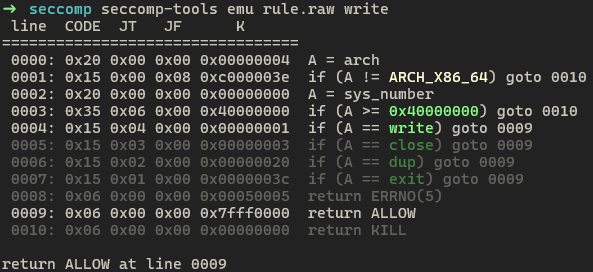
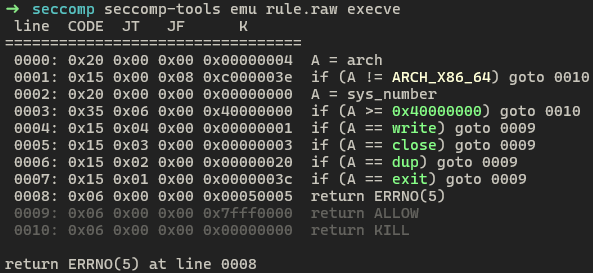
emu
The emu is a good command to check whether syscalls are properly called or blocked by emulating rule sets. When ran in bash, the output is colored and easy to check.
0x03. Expected Vulnerability
Of course, it depends on how it was coded, but I thought about vulnerabilities that could occur easily.
x32 Syscall
In the previous example of disasm command in seccomp-tools, there were rules like these.
0000: 0x20 0x00 0x00 0x00000004  A = arch
0001: 0x15 0x00 0x08 0xc000003e  if (A != ARCH_X86_64) goto 0010
0002: 0x20 0x00 0x00 0x00000000  A = sys_number
0003: 0x35 0x06 0x00 0x40000000  if (A >= 0x40000000) goto 0010
The 0001 line is the logic to check if the architecture is X86_64, then why does it check if the sys_number of the 0003 line is greater than 0x40000000?
The reason is the compatibility of the X86_64 architecture. It was developed for the instructions used in the previous 32-bit to be also used in the 64-bit architecture, and this whole concept is called the x32 ABI. Therefore, 32-bit syscalls can be called in the 64-bit architecture, and the method for doing so is to add 0x40000000 to the 64-bit syscall number in Linux.
Let’s look at the code of the do_syscall_x32 function that is called when a 32-bit syscall is actually called in the Linux kernel.
static __always_inline bool
In the first line of the function, xnr = nr - __X32_SYSCALL_BIT is executed, and the __X32_SYSCALL_BIT value is predefined value 0x40000000.
Therefore, if there is no logic to verify that the syscall number is less than 0x40000000 in the BPF rule of a 64-bit binary, even if a specific syscall is blocked, you can still call the syscall of the 32-bit architecture by adding 0x40000000 to the syscall number using the x32 ABI.
Filter Overwrite
The simplest idea that comes to mind is that it is a vulnerability that can occur when the BPF filter rule part in memory can be overwritten with a desired value before SECCOMP is set. There are ways to do this, such as changing the rule to allow calling the desired syscall, or overwriting the rule with return ALLOW.
There is a related challenge on dreamhack.io, which I recommend trying.
SECCOMP Bypass
I found out while using PR_SET_SECCOMP that if the BPF rule is slightly wrong, the prctl function only returns an error and does not terminate the process.
if ()
|
=================================
)
Here is an example of a wrong BPF rule. If you look closely, you will see that it says goto 0005 on line 0001. When composing wrong.txt, I thoughtlessly set line of goto as 3 where return KILL is located, but I found out that I had to calculate the line as a relative address.
For example, if goto 0 is on the current line 0001, it is interpreted as going to the next line, 0002; and if it’s goto 1, it is interpreted as going to the next next line, 0003. So goto 3 becomes a command to go to line 0005. Since line 0005 does not exist in wrong.txt, an error occurs when passing it as an option to prctl.
When the wrong rule is applied, a SECCOMP error occurs like this. As a result, the rule that was supposed to block the write syscall was not applied, so the input string was output to STDOUT.
Therefore, even if the entire filter cannot be overwritten like Filter Overwrite, if the rule itself can be made nonsensical with a few bytes, an error will occur, but the process will be maintained, so SECCOMP bypass is possible.